All your inboxes, one inbox.
With search, drafts and Apple Intelligence on device.

macOS 26 · In development
warfta brings Gmail, Microsoft 365, iCloud and any IMAP mailbox into one calm app for the Mac — with calendar and tasks. No warfta server, tracking pixels blocked. Buy once, no subscription.
We’ll get in touch once there’s something to show. Never shared, unsubscribe any time. How we handle your address is explained in our privacy policy.

Mail · Calendar · To-do
With search, drafts and Apple Intelligence on device.
Calendar
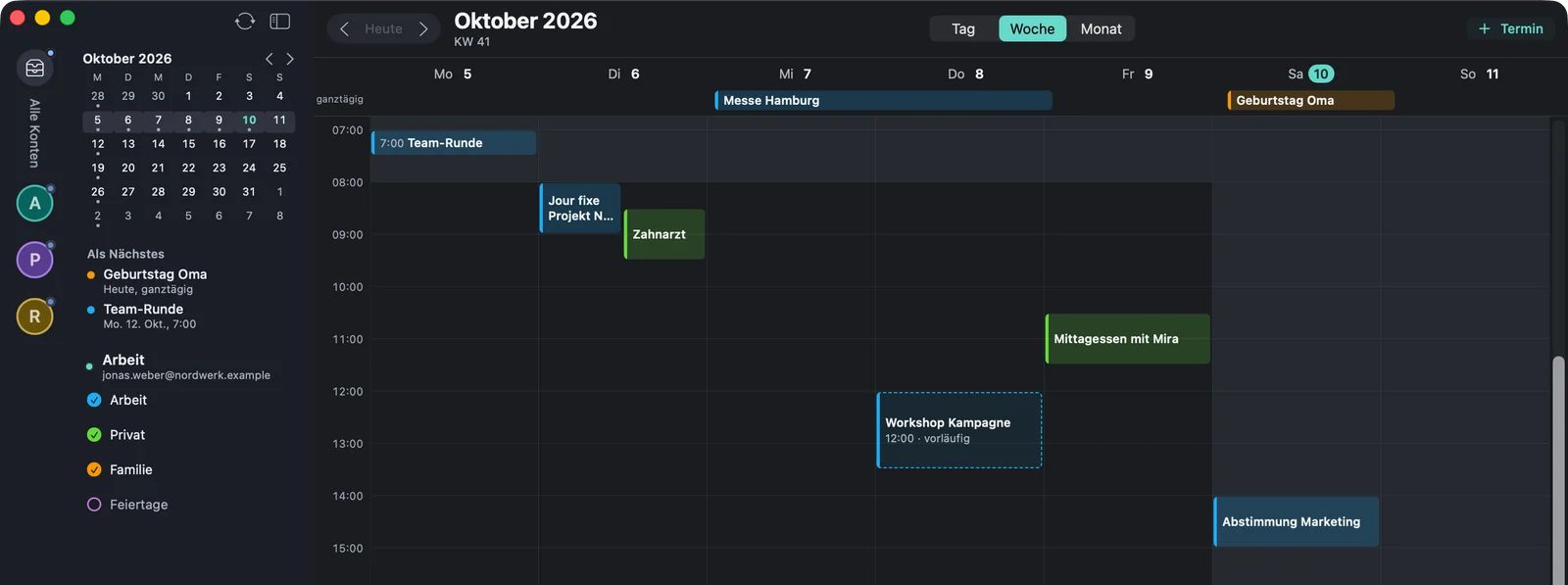
Already in the appWeek, day and month next to your mail. Answer invitations, create events.
To-do
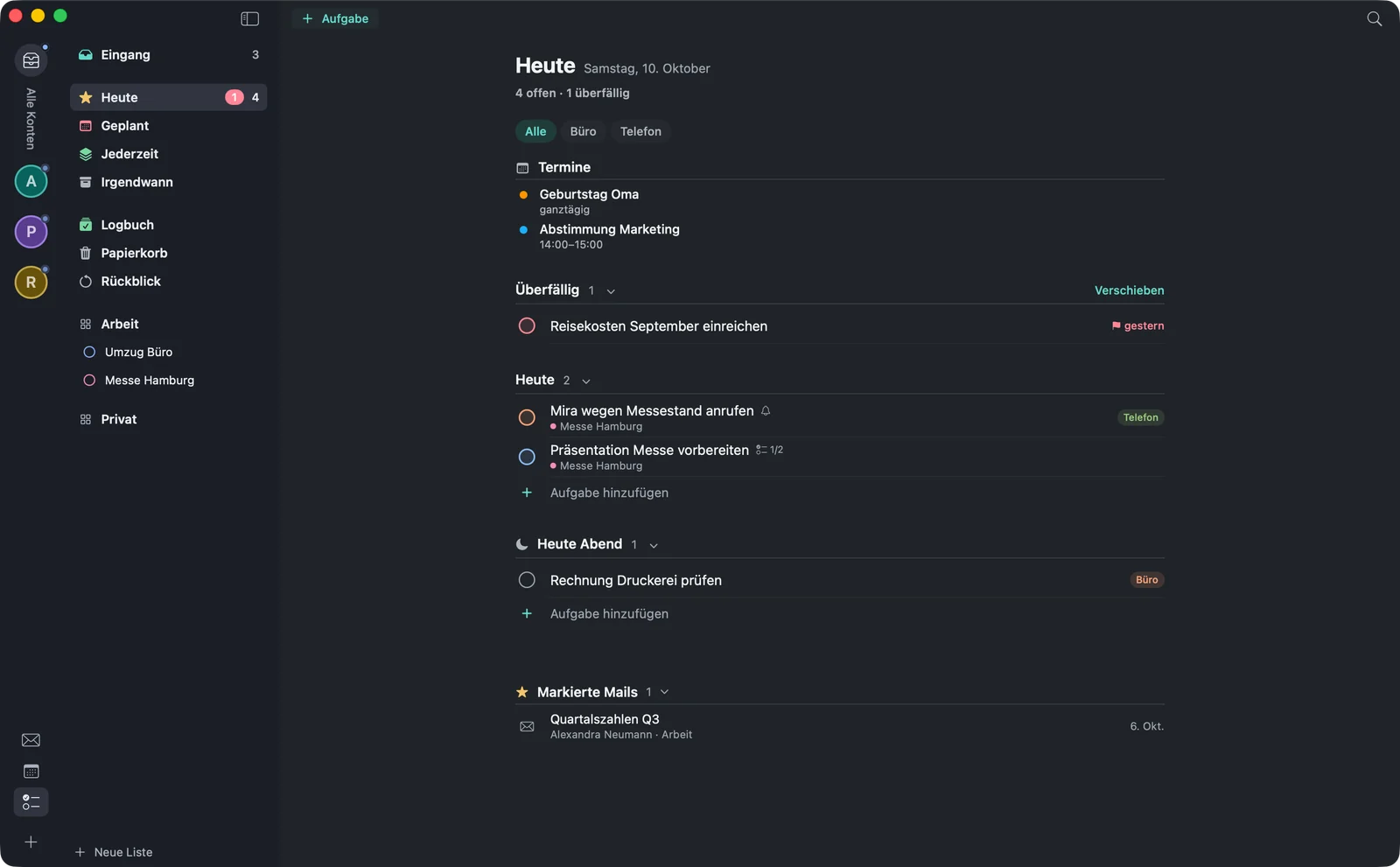
Already in the appWith a link to the mail they came from. Inbox, Today, Scheduled, Anytime, Someday and Logbook.
Working together
How mail, calendar and tasks interlock — recreated with sample data. Each step shows its stage.
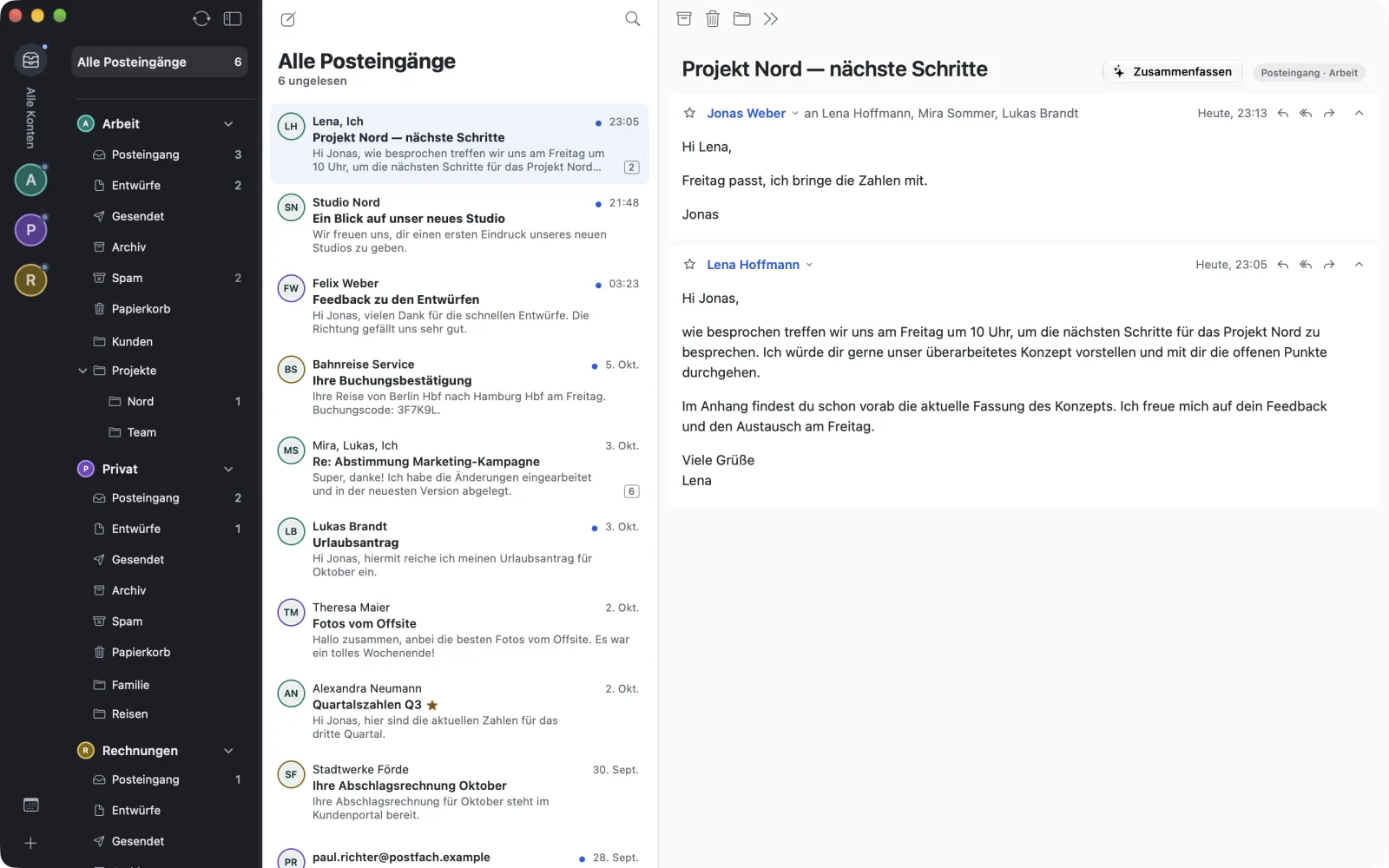
One shared inbox for all your accounts.
Already in the appWith ⌥⌘T the mail becomes a task in your inbox. One click takes you from the task back to the mail.
Already in the appWith ⌥⌘E the mail becomes an event, alongside the others in your week.
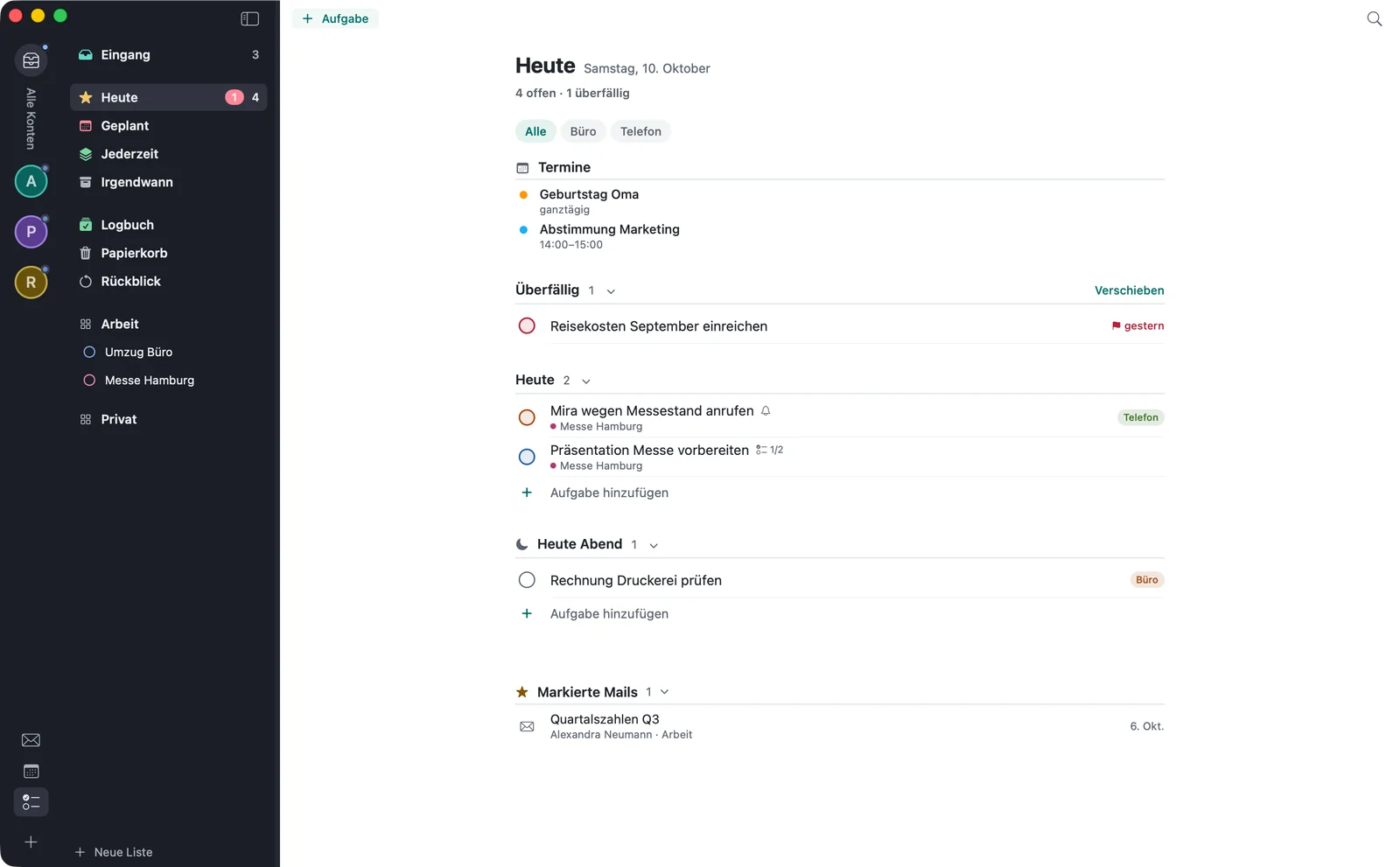
Already in the appOne view for the day: events, tasks and flagged mails. Overdue items come first.
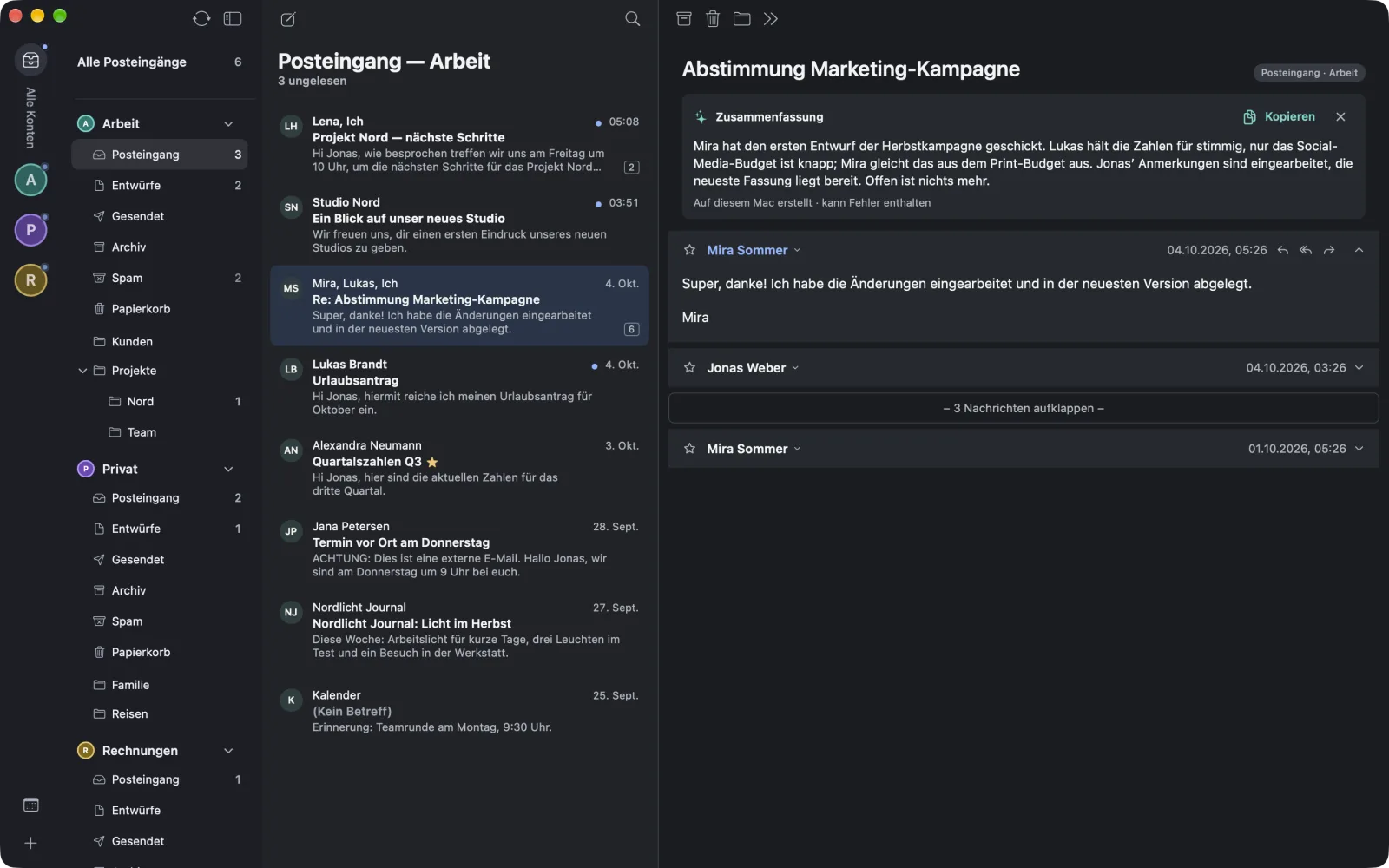
Already in the appRecreated interface with made-up sample data, not a screenshot. Labels as in the German app.
Every action is visible exactly once, keyboard shortcuts included. What you do takes effect immediately — even when you’re offline.
One shared inbox for all your accounts. Each account has its own colour, so you can see where a mail comes from.
Mails are grouped into conversations, with your replies included. The newest is open, older ones fold away.
Search runs on your Mac and answers instantly. You search on the server only when you want to.
Formatted or plain text, with signatures per account — images included. Drafts sync with your mailbox.
Archive, flag, move — via a folder search or by dragging onto the folder. Every action takes effect immediately and can be undone shortly after with ⌘Z.
What you do offline, warfta sends later. A mail that didn’t go out stays under “Unsent”.
Preview with Quick Look, drag into the Finder, save all at once. warfta warns you about executable files.
In Dark Mode, bright mails are gently darkened. The list shows them normal or compact, with up to three preview lines.
For every day
Put a mail off until later. At the time you choose, it’s back at the top of your inbox, unread.
⌃⌘L
If the display name shows a different address from the sender’s, or a link leads somewhere other than it claims, warfta tells you. The check runs on your Mac.
One click, and the list shows only unread, flagged or mails with attachments.
The folders you need all the time sit at the top of the sidebar — across all accounts.
Shortcuts as in Apple Mail. Select several mails with ⇧- or ⌘-click and handle them all at once.
⌘A
Accounts
Already in the appSign in with Google or Microsoft the way you’re used to — or add any IMAP mailbox. warfta recognises the server settings of well-known providers by itself.
One shared inbox for all your accounts. Each account has its own colour, so you can see where a mail comes from.
Apple Intelligence
Already in the appwarfta uses the language model that runs on your Mac — not the cloud. Mail content never leaves the device for this, and none of it is stored. You can turn it off at any time.
Requires a Mac with Apple Intelligence turned on. Spam is never processed, and the model doesn’t follow instructions contained in a mail.
One click sums up a long conversation in a few sentences. If there’s a task in it, you create it right from the summary.
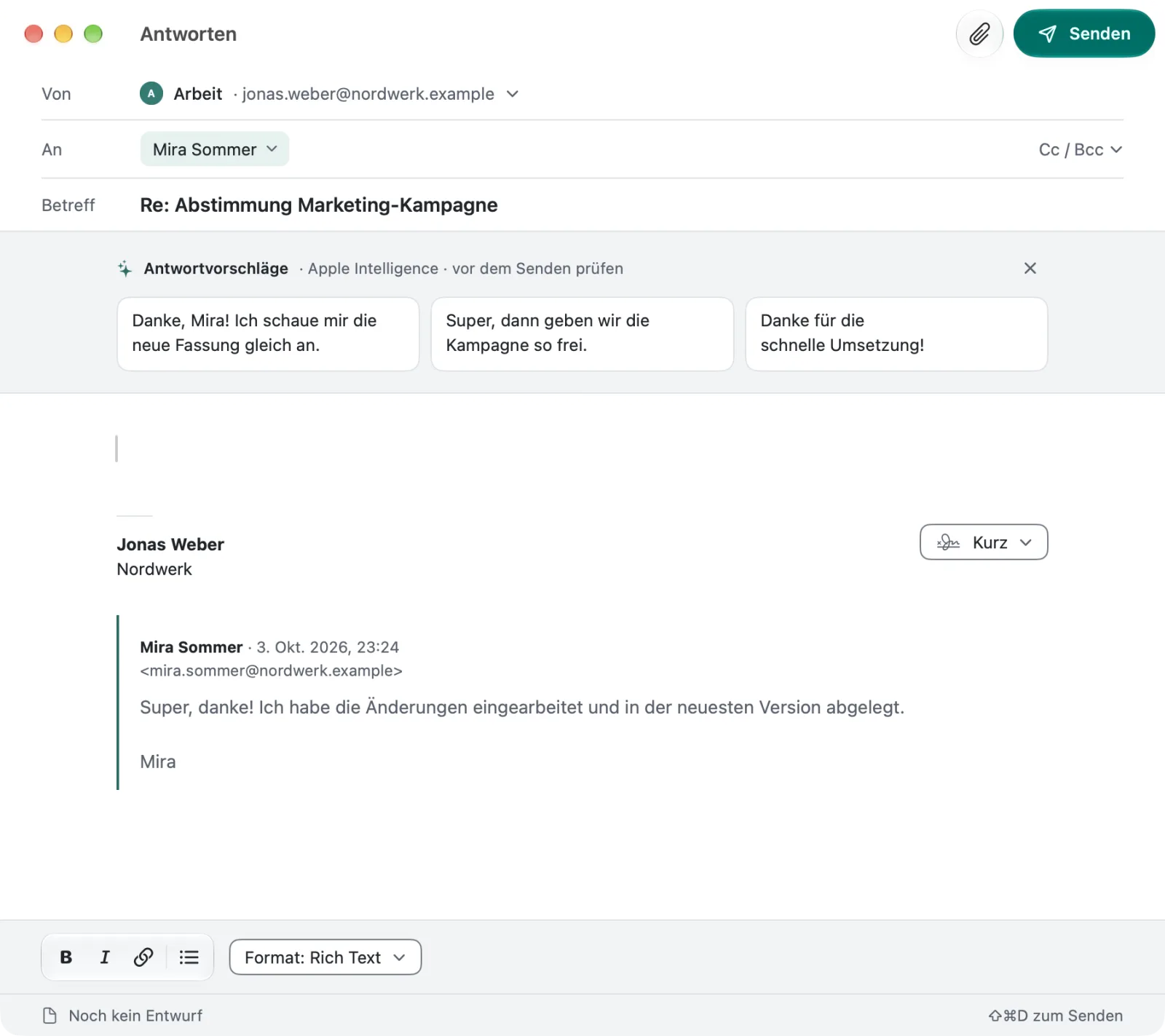
When you reply, warfta suggests three short answers. You decide whether to use one, and which.
Calendar
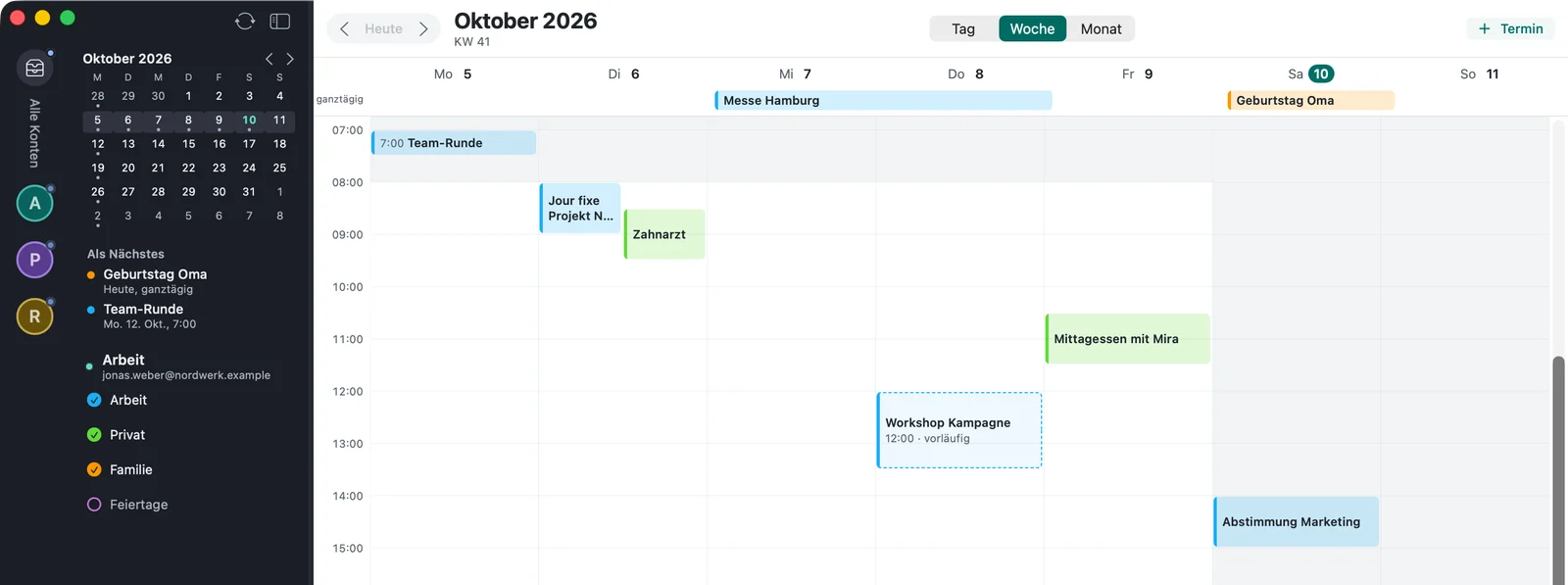
Already in the appDay, week or month, with the calendars of all your accounts. You answer invitations right in the conversation and create events wherever you are — even straight from a mail.
⇧⌘T
Google, Microsoft, iCloud and CalDAV — such as Fastmail, mailbox.org or Posteo — in one view. With a mini month and “Go to date”.
Your next four events sit in the sidebar, even while you read mail.
⌘1⌘2⌘3
Mail, calendar and tasks live in one window, and a shortcut switches between them.
⌥⌘E
Create, change, delete, recurring events too. In one sentence via quick entry or straight from a mail — the event stays linked to it.
Add a Teams or Meet link right away and invite attendees. Teams with Microsoft 365 accounts (not Outlook.com), Meet where Google allows it; inviting in Google and Microsoft calendars.
A notification before every event, with a lead time you set — 15 minutes by default.
An invitation appears as an event card in the conversation. warfta checks that it really comes from the stated sender.
Tentatively too, with a comment or without notifying. For IMAP accounts the answer goes to the organiser as a mail — that needs an outgoing mail server.
Events with Teams, Meet, Zoom, Webex, GoTo, Whereby or Jitsi show a button to join.
Tasks
Already in the appA task list closely tied to mail and calendar: every task from a mail points to the mail it came from. Anything else that comes to mind, you capture with a shortcut from any app.

Recreated quick entry with sample data: warfta recognises date, @tag, #project and priority as you type.
⌃⌥⌘Space
A shortcut opens an input field over any app. Date, deadline, @tag, #project and priority light up as you type — you can create events this way too. The shortcut is up to you.
⌥⌘T
A mail becomes a task that points to the mail. Mails from Apple Mail you simply drag onto the list.
If a conversation contains a task, you create it from its summary with one click. Requires Apple Intelligence.
When you want to start something and when it has to be done are entered separately.
P1 to P4, visible on the coloured checkbox. Projects and tags get colours of their own.
Recurring tasks, checklists inside a task and reminders at the time you choose.
Projects with areas and headings, as a list or as a board. A circle shows how far along a project is.
The “Waiting” tag records whom you’re expecting something from and since when. On sent mails it’s called “Waiting for reply”.
A guided pass through all your lists. It also shows projects that are missing a next step.
On all your Macs. Tasks sync through your iCloud. For mails, only the reference is transferred, never the content.
In developmentOn the Mac
Already in the appwarfta fits into macOS instead of standing next to it: what’s in the app, you also find through Spotlight, Siri and the desktop.
You also find tasks, projects and mails via Spotlight — the latest 5,000 mails with subject, sender and preview. You can turn this off in the settings.
Create a task, today’s tasks, upcoming events, count unread mails — as a shortcut, in your own automations or via Siri.
Small or medium on the desktop, with the day’s tasks. You can check them off right in the widget.
Privacy
Already in the appwarfta is an app, not a service. Nobody stands between you and your mail provider.
Your mail travels only between your Mac and your mail provider. We never see it.
warfta loads external images only when you allow it — once, or for senders you trust.
JavaScript in mails stays off, content is sanitised. For spam, warfta shows no embedded images.
Passwords and sign-ins are stored in your Mac’s keychain. Sender pictures work without Gravatar.
No usage statistics, no analytics services. Logs contain neither mail content nor addresses.
Export and backup
Already in the appYou export mail to open formats and back up tasks to a file — by hand or automatically every day. None of it goes through us.
Save a single mail as an .eml file that other mail programs can open.
⇧⌘S
Whole folders in the widely used mbox format, with a progress indicator and cancellable at any time.
Back up all your tasks to one file and restore them from it.
If you like, warfta backs up your tasks every day to a folder of your choice, such as iCloud Drive. The last 14 backups are kept. It’s off by default.
iPhone and iPad
Plannedwarfta for iPhone and iPad is planned. The core of the app — accounts, sync, search, storage — has been built from the start without Mac-specific parts, so it can run there too.
What the app will look like on iPhone and iPad hasn’t been designed yet. People on the waitlist will see it first.

Pricing model
warfta will be a one-time purchase, not a subscription. You pay for the app once — instead of every month.
Questions
warfta will be a one-time purchase, no subscription. We’ll share the price as soon as it’s set — people on the waitlist hear it first.
We’ll name a date only once we can keep it. Until then, we’ll only write when there’s something to show.
Yes. You sign in with Microsoft the way you’re used to — with Microsoft 365 or Outlook.com. Mail and calendar then appear in warfta, along with Focused and Other sorting. You create Teams meetings with Microsoft 365 accounts, not with Outlook.com.
Without moving anything: you add your accounts in warfta, and your mail stays where it is — with your provider. Whatever is there shows up in warfta, and you can keep using your current program alongside it.
Yes. You save a single mail as an .eml file and a whole folder in mbox format, which other mail programs can import. You back up tasks to a file and restore them from it.
warfta runs on macOS 26 and later. Summaries and reply suggestions require a Mac with Apple Intelligence turned on; everything else works without it.
warfta has no server of its own. Your mail lives with your provider and on your Mac, and the AI features compute on the device.
We’re working on it: syncing through your iCloud is in development. Until then your tasks live on your Mac; you can already back them up today, daily and automatically too.
Planned, but not started yet. The core of warfta has been designed from the start so that it can run there too.
The app speaks German and English.
By email — you’ll hear back from the people building warfta. What helps us with a bug and how to revoke Google’s or Microsoft’s access is on the support page. To the support page
Built by MOJM
MOJM is a family-run tech company from Heiligenhaus, Germany. No anonymous ticket system, no escalation levels and no investor pressure: we build software we can stand behind ourselves — and that we use ourselves every day.
The name comes from the warft: a man-made mound in the Wadden Sea on which houses stand above the flood. That’s how warfta should feel when the mail is rising.
In development
We’ll write when there’s something new to show — and when warfta is ready for you to try it yourself. Nothing in between.
We’ll get in touch once there’s something to show. Never shared, unsubscribe any time. How we handle your address is explained in our privacy policy.